Get Traffic Stats Client Messages Per Second
When you want to display this information to the user on the client, then you can just activate the TrafficStats
via 'SetTrafficStatsEnabled()' and then retrieve the total message count in that room since you have activated
the traffic stats by a call to 'GetTotalMessageCount().' Then simply divide it
through GetTrafficStatsElapsedMs()' and multiply the result * 1000 to get the messages per second in that
room. When you want to have the average data per client for all users of a game of yours, then you could simply
look into your Photon dashboard
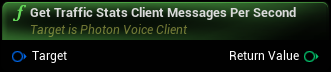
Inputs
|
Target
Photon Voice Client Object Reference
|
Outputs
|
Return Value
Integer
|
When you want to display this information to the user on the client, then you can just activate the TrafficStats |