Get Empty Room Time to Live
Gets the room time to live in milliseconds. You need to join a room to get the real value.
The amount of time in milliseconds that Photon servers should wait before disposing an empty room.
A room is considered empty when there is no active player joined to it.
So the room disposal timer starts when the last active player leaves.
When a player joins or rejoins the room, then the countdown is reset.
By default, the maximum value allowed is:
300000ms (5 minutes) on Photon Cloud
60000ms (1minute) on Photon Server
0 (default) means that an empty room gets instantly disposed.
All positive values set the keep-alive time to their value in milliseconds.
All negative values get ignored and the behavior for them is as if the default value was used.
Note: The disposal of a room means that the room gets removed from memory on the server side.
Without accordingly configured Webhooks this also means that the room will be destroyed
and all data related to it (like room and player properties, event caches, inactive players, etc.)
gets deleted. When Webhooks for the used appID have been been setup for room persistence, then
disposed rooms get stored for later retrieval. Stored rooms get reconstructed in memory when a player
joins or rejoins them
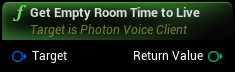
Inputs
|
Target
Photon Voice Client Object Reference
|
Outputs
|
Return Value
Integer
|
Gets the room time to live in milliseconds. You need to join a room to get the real value. |